
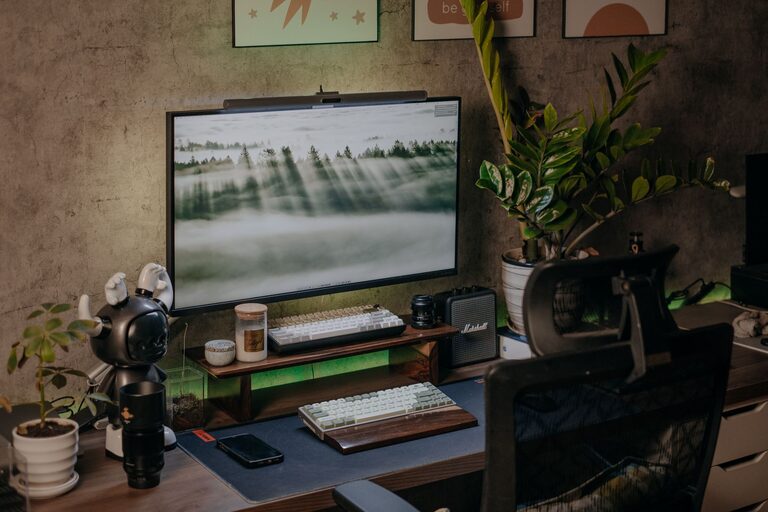
Tips for Creating a Relaxing Home Workspace to Boost Productivity and Comfort
Creating a relaxing home workspace is essential for maintaining productivity and comfort while working remotely. With many people spending significant time at home for work, having a dedicated space that promotes focus and a sense of calm can make a big difference in how you feel and how efficiently you work.
In this post, we’ll explore several practical tips for designing a home office that helps reduce stress, increase comfort, and improve your overall work output.
Why a Relaxing Workspace Matters
Working from home can blur the line between personal life and professional responsibilities. Without a proper environment, distractions and discomfort may take a toll on your motivation and concentration. A relaxing workspace helps you mentally separate work from leisure while creating a comfortable and inviting area that encourages consistency and productivity.
—
Choosing the Right Location
Select a Quiet, Well-Lit Spot
Where you place your workspace is key. Try to find a quiet corner or room with minimal foot traffic. Natural light is also important; it boosts mood and reduces eye strain. Position your desk near a window if possible, but avoid glare on your computer screen.
Consider Privacy
If your home is busy or shared, think about how you can create privacy. Using room dividers or noise-canceling headphones can help you focus better and reduce interruptions.
—
Invest in Comfortable Furniture
Ergonomic Chair and Desk
Comfort supports productivity. An ergonomic chair with good lumbar support and adjustable height can prevent back pain during long work hours. Combine it with a desk that suits your height and allows you to keep your wrists straight when typing.
Keep Essentials Within Reach
Organize your desk so that frequently used items like pens, notebooks, and your computer are easily accessible. This minimizes distractions caused by searching for supplies mid-task.
—
Decorate with Purpose
Use Calming Colors
Colors impact mood and focus. Soft, neutral tones or cool blues and greens can create a soothing atmosphere. Avoid overly bright or harsh colors that might increase stress or fatigue.
Add Personal Touches
Incorporate items that make you feel relaxed and motivated, such as plants, artwork, or photos. These elements can inspire creativity and make your workspace feel welcoming without cluttering the area.
—
Control Lighting and Screen Setup
Balance Natural and Artificial Lighting
In addition to natural light, use adjustable task lighting, like a desk lamp, to reduce eye strain during darker hours. Avoid direct overhead lighting that can cause glare.
Position Your Screen Correctly
Place your computer monitor at eye level about 20–30 inches away to reduce neck strain and ensure proper posture. You might also consider a screen filter to minimize blue light exposure.
—
Introduce Organization and Storage
Declutter Regularly
A tidy workspace helps clear your mind. Remove unnecessary papers and items daily, and only keep what you need on your desk.
Use Storage Solutions
Shelves, drawers, or filing cabinets keep supplies organized and out of sight, contributing to a calm environment. Labeling storage can also save time looking for materials.
—
Incorporate Relaxation Elements
Add Greenery
Plants not only freshen the air but also reduce stress and improve concentration. Choose low-maintenance indoor plants such as succulents or snake plants.
Use Aromatherapy Wisely
A subtle scent like lavender or eucalyptus can help create a relaxing atmosphere. Use essential oil diffusers or scented candles, but make sure they don’t cause distractions or allergies.
—
Establish Clear Boundaries
Define Work Hours
Setting specific work hours helps separate work from personal time, reducing burnout. Communicate these boundaries with others in your household.
Create a Transition Routine
Start and end your workday with a ritual, such as stretching or a short walk, to signal your brain when it’s time to focus and when to relax.
—
Optimize Technology
Minimize Distractions
Turn off unnecessary notifications and use apps to block distracting websites during work periods.
Use Quality Equipment
Ensure your internet connection, keyboard, and headset are reliable and comfortable to avoid frustration and interruptions.
—
Prioritize Breaks and Movement
Schedule Regular Breaks
Step away from your desk every hour for a few minutes to stretch, hydrate, or rest your eyes. These mini-breaks boost energy and reduce fatigue.
Create a Break Area
If space allows, have a separate spot for breaks that encourage relaxation, like a comfy chair or a small lounge area.
—
Final Thoughts
Creating a relaxing home workspace is about blending comfort, organization, and personalization to support your work style. By paying attention to location, furniture, décor, lighting, and boundaries, you can design a space that not only promotes productivity but also nurtures your well-being.
Start small — even simple changes like decluttering your desk or adding a plant can make a big difference. Over time, your workspace will become a place where you look forward to spending your workday, leading to better focus and a more enjoyable work-from-home experience.
